Before buying a LiberNovo chair, check three things: can your feet rest securely, does the seat leave room behind your knees, and can you get close enough to your keyboard? A long feature list cannot make up for a chair that does not fit your body or desk.
This buying guide looks at the LiberNovo Omni listed on the Korean official website. It is based on published product information, not a hands-on review or a long-term comfort test. We currently have no sponsorship or affiliate relationship with the brand.
What makes the LiberNovo Omni worth a look?
The main attraction is its backrest design: flexible panels and linked components intended to support changes in posture. The manufacturer also lists adjustments for the headrest, lumbar support, armrests and seat height. See the Korean Omni product page for the underlying specifications.
That makes it an interesting candidate if you alternate between typing, reading and leaning back. The useful question is how that movement feels while doing your own work. Does the headrest push your head forward? Does your shirt pull upward as you recline? Can your arms remain supported when you return to the keyboard? A mechanism described as dynamic does not answer those questions by itself.
| Item | Published detail | Buying implication |
|---|---|---|
| Suggested height and load | 158–190 cm; maximum 136 kg | Height alone does not establish fit: leg length and seated height vary. |
| Weight | 31 kg total | Plan delivery, assembly and any movement between floors. |
| Adjustment | 3D headrest, 4D armrests, lumbar and seat-height adjustment | Check whether the actual adjustment range reaches the position you need. |
| Recline | The page shows both 165° and 160° as the maximum | Ask for the manual and specification for the exact option being sold. |
Do not combine these details with specifications for the Omni SE, PRO or overseas Omni Gen. An overseas review may describe a different seat option, warranty or return policy. This article is about the Korean-listed Omni; check your regional model before ordering.
How to choose an ergonomic chair, in a useful order

1. Start with seat height and usable depth
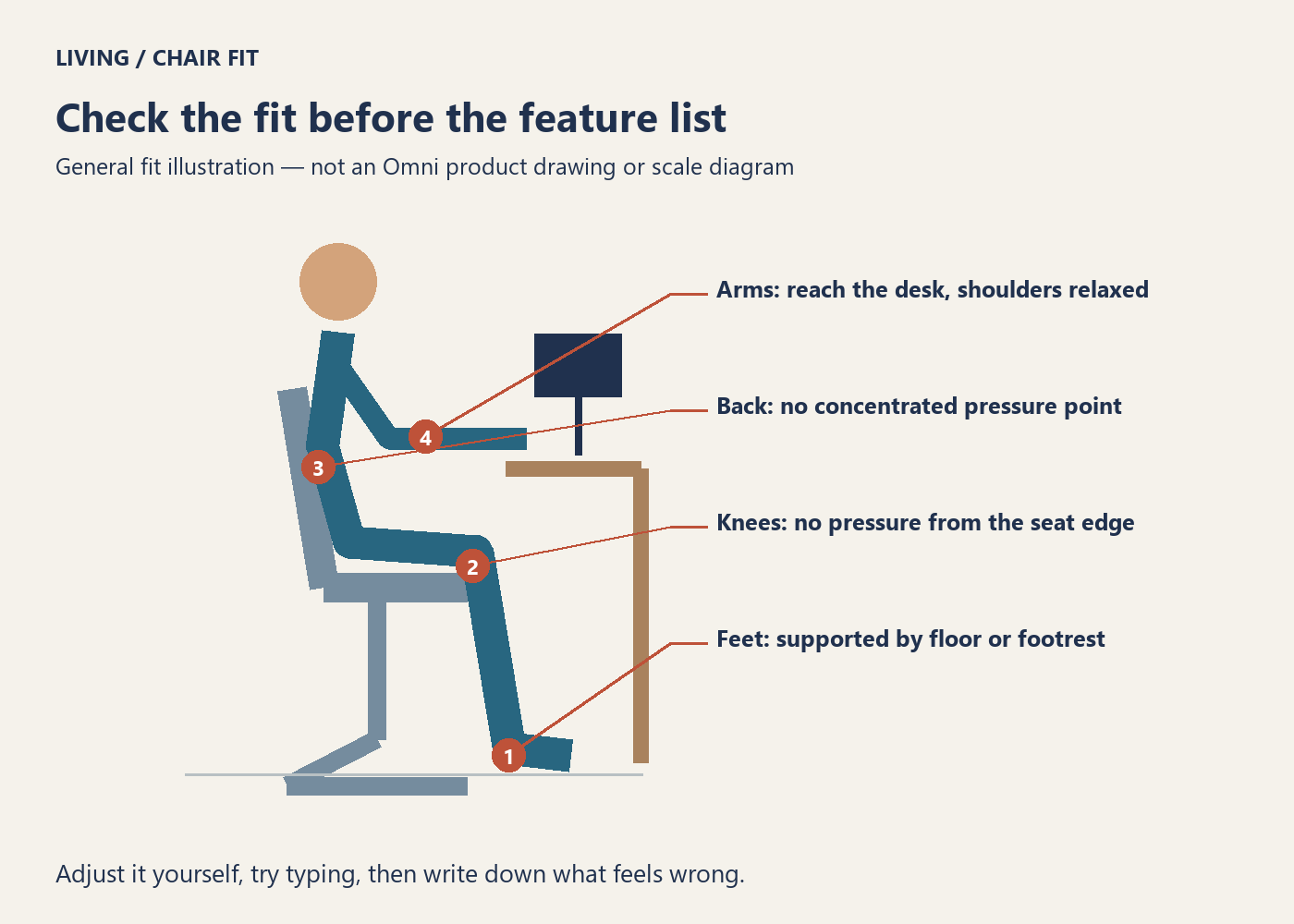
Sit back against the backrest. Your feet should have stable support from the floor or a suitable footrest, and the front edge should not press into the backs of your knees. If you have to perch at the front to reach the floor, you lose the support you were buying the chair for. These fit principles are consistent with CCOHS guidance on selecting an ergonomic chair.
Overall dimensions are not seat dimensions. A listing can tell you how much room a chair occupies without telling you its lowest seat height or usable seat depth. Ask for those measurements for your exact option. If your current chair feels too deep, record that measurement and the problem it causes; this gives a seller more useful information than your height alone.
2. Look for comfortable lumbar contact, not the strongest push
Try a gentle setting first, then adjust it. Notice whether support stays comfortable when you lean back or concentrates pressure on one small spot. More force is not automatically a better fit. Treat Omni’s adjustment as something to try, rather than a reason to assume it will suit you.
We have not established clinical treatment benefits for this chair. Marketing about posture or comfort should not be read as proof that a chair treats back pain. The desk, screen and work habits still matter.
3. Test the armrests while actually using a keyboard
A chair can feel good in an open showroom and clash with the drawers or frame beneath your desk. Measure the clearance underneath your own desk, then check whether you can roll close enough with the armrests adjusted. Try your normal mouse position too.
HSE’s workstation guidance recommends relaxed shoulders and a keyboard just below elbow height. If a low laptop screen is making you bend forward, a separate keyboard and a better screen position may deserve attention alongside the chair.
4. Test returning to work, not just the deepest recline
Lean back, then return to typing. Are the controls easy to reach? Can you find the setting again without standing up? Is there enough space behind the chair? The deepest position shown in a product video may not be a position you can use beside your wall or shelves.
If you want a separate footrest, include its footprint in the room plan. A footrest appearing in promotional material does not establish that it is included in every package.
5. Compare upholstery against your own routine
Think about whether you run warm, dislike a surface against bare legs, or regularly have food and drinks at your desk. Inspect the material and cleaning instructions. “Mesh” and “cushion” are useful categories, but they cannot tell you how a particular chair will feel or how easy a spill will be to clean.
A practical ten-minute showroom checklist
This is a suggested comparison routine, not a validated test or a promise about long-term comfort.
- Set it up yourself. Adjust height and lumbar support rather than judging only the salesperson’s settings.
- Type and use a mouse. Check whether you can stay supported while reaching the controls you use every day.
- Read while leaning back. Notice whether the headrest or armrests become obstacles.
- Return to work. Find your settings again while seated.
- Write down specific problems. For example: pressure behind the knees, raised shoulders, or support pressing on one spot.
Use the same list for a second chair. “Fits under my desk” and “feet lift when I sit back” are more useful comparison notes than two separate first impressions of softness.
Six questions to ask before ordering an Omni
- What are the minimum and maximum seat heights and the usable seat depth for this exact option?
- How high are the armrest tops above the floor at their lowest setting?
- Is the maximum recline 160° or 165°? Can you provide the matching manual?
- Are the footrest, charging accessories and assembly included?
- What coverage applies separately to the frame, battery and powered components, and who pays repair transport costs?
- Can I return it after assembly and a fit trial? What packaging and collection-cost conditions apply?
Powered features may be convenient if you frequently change settings, but they also add charging and component service to the ownership checklist. If you rarely adjust a chair after setup, dimensions and a workable return policy may deserve more of your budget. This is a way to prioritize a purchase, not a claim about comparative failure rates.
Also read our room and delivery-route measurement guide. Compare the total cost of the chair, delivery, assembly, any footrest and possible return collection—not only the price on the product card.
Who should shortlist it?
The Omni is worth comparing if you want to use its adjustments as you move between working positions. If your feet cannot rest comfortably or the armrests clash with your desk, those problems deserve more weight than a longer feature list. Try another size or design before compromising on fit.
Even a well-fitting chair is not a reason to remain still all day. Build in short opportunities to stand, move or change activities, as described in HSE’s advice on work routines and breaks.
Sources checked September 20, 2026. Product details refer to the Korean official listing. Confirm the current price, availability, warranty and return terms with the seller for your region. This article contains no affiliate shopping links or advertising banners.